
Suprata for associations and membership organizations
Dues, renewals and member events without the spreadsheet
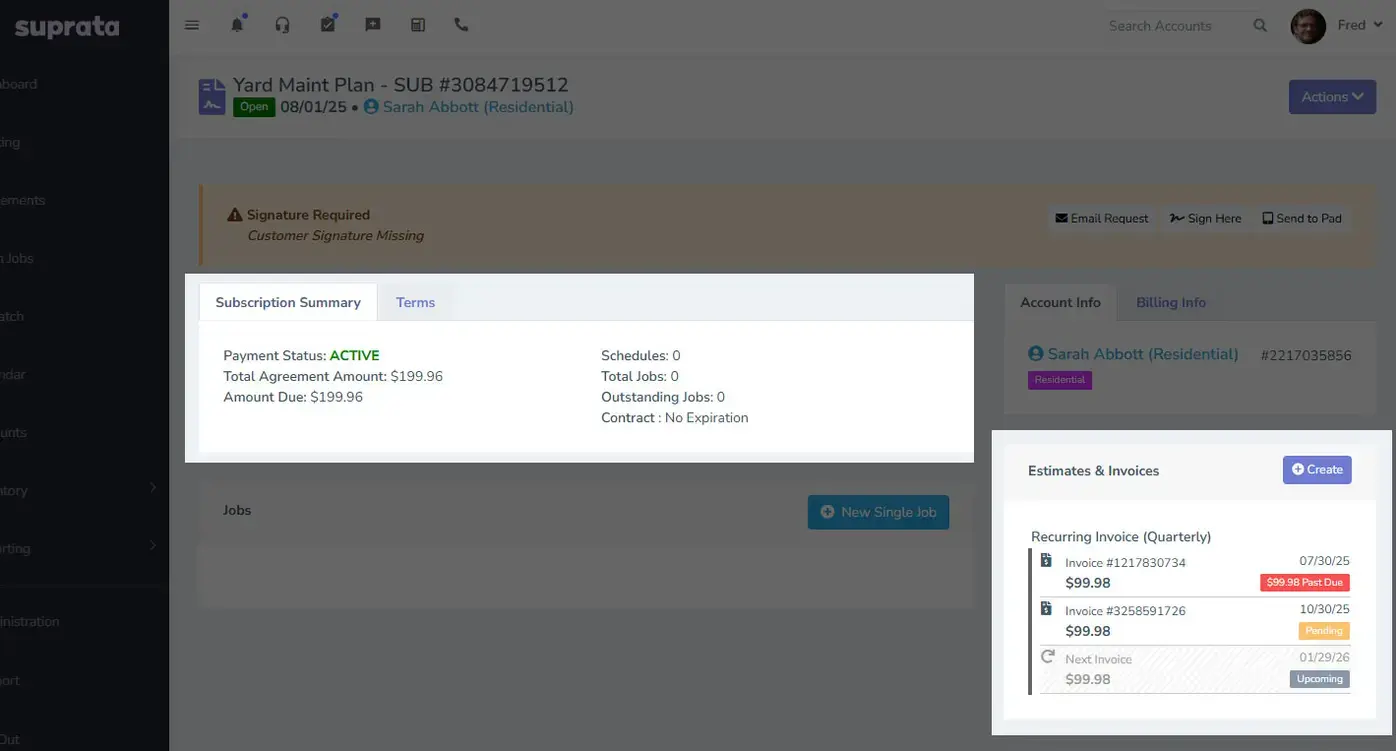
Each member organization is one account with all its people on it. Dues bill on their own cycle and charge the saved card, and members see their invoices and receipts in a branded portal. Conference sessions sell seats online, and Suprata Agenda runs the board meetings.

Sound familiar?
What a normal week looks like without the right system
We hear these from associations and membership organizations all the time. Here is what Suprata does about each one.
Half our renewals come in late because the invoice went to someone who left the member company two years ago.
Each member organization is an account with several contacts, so you change who gets the bill without losing history.
Some members pay dues yearly and some monthly, and I reconcile it all by hand in QuickBooks.
Subscriptions bill on any cycle with autopay, and Suprata syncs to QuickBooks Online or Xero.
Workshop sign-ups live in one tool, dues in another and the member list in a third.
Workshop seats, dues and contacts all sit on the same member account.
Our board packet is a 90-page email attachment nobody can search.
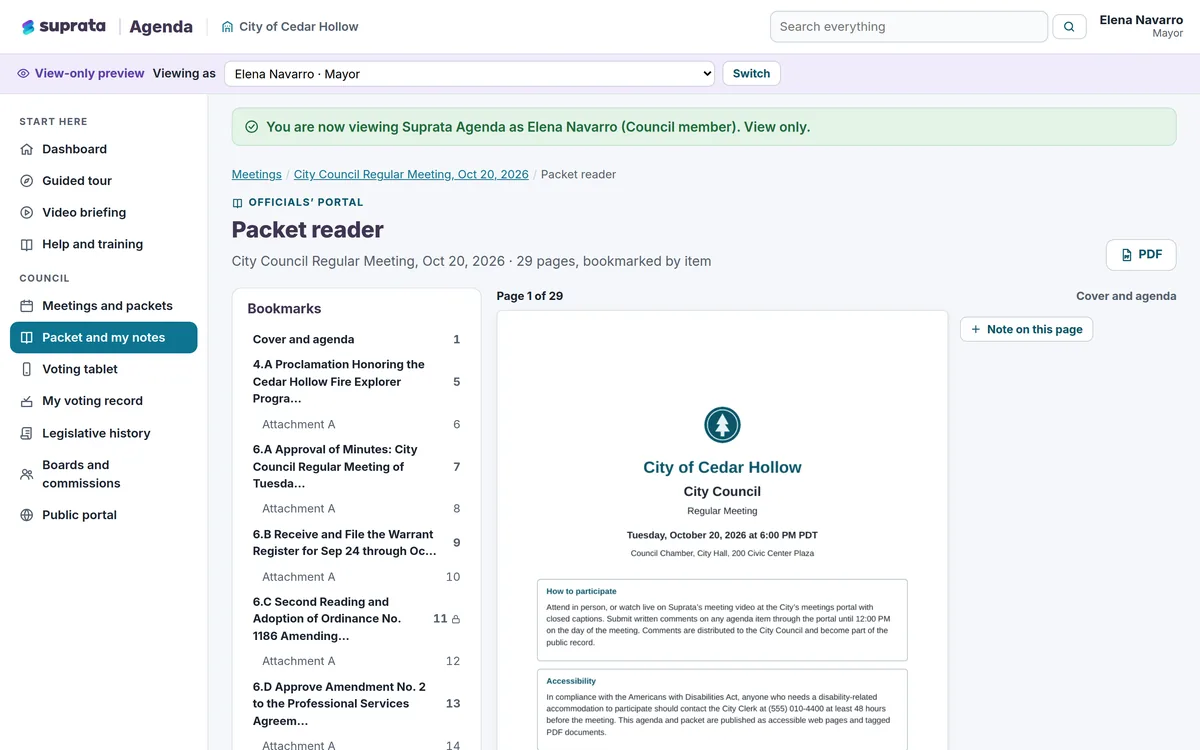
Suprata Agenda publishes one bookmarked PDF packet and a tablet reader with private notes.
What runs your day
The parts of Suprata that fit associations and membership organizations
Suprata is a versatile workflow and business intelligence platform that delivers the power of custom software with ease and affordability. These are the pieces that matter most to you.
Suprata Subscribe
Dues bill monthly, quarterly or yearly with autopay, with Membership Manager and Membership Sales dashboards.
See Subscribe Suprata Suite moduleSuprata CRM
One account per member organization with many contacts, tags and the full history.
See CRM Built into the platformCustomer portal
Members pay invoices, swap cards, see receipts and take surveys in a branded, passwordless portal.
See Customer portal Suprata Suite moduleSuprata Reservations
Conference sessions and workshops sell seats by class, with QR tickets and printed rosters.
See Reservations Suprata Suite moduleSuprata Integrate
Dues, payments and members sync one way to QuickBooks Online or Xero.
See Integrate Ready-made solutionSuprata Agenda
Board agendas, packets, live votes and minutes, with a public portal if you need one.
See Agenda Ready-made solutionSuprata Clearinghouse
A searchable library of member guides, toolkits and webinars.
See ClearinghouseA day in the life with Suprata
One ordinary day, start to finish
Here is how the work flows when every call, job, booking and payment lives in one place.
-
8:00 am
Daily brief
Suprata writes the membership manager a short brief of what needs her today.
-
9:00 am
Dues charge
Today's renewals charge saved cards. Failed cards show on the accounting dashboard to follow up.
-
10:30 am
A new member company joins
Staff create the account with three contacts, start the subscription and send the portal link.
-
1:00 pm
Conference sessions on sale
Workshop sessions go on sale with member and non-member seat classes.
-
3:00 pm
Past-due follow-up
The aging report shows who to call first, and statements of account go out with a pay link.
-
4:30 pm
Board packet
The executive director publishes next week's agenda, and the bookmarked packet goes to board members.
See it on screen
Real Suprata screens
Sample data, real software. Every screen below comes straight from Suprata.
Questions we hear
Straight answers
Asked by associations and membership organizations before they switch.
Can members pay dues monthly or yearly?
Yes. Each subscription has its own cycle and charges a saved card or bank account automatically.
Read: Subscriptions vs. Service Agreements vs. Recurring Invoices
Does it work with our accounting software?
Suprata syncs to QuickBooks Online or Xero. The sync runs one way, from Suprata to your books.
Do members need a password for the portal?
No. They sign in with a one-time code or a link sent to their email.
Is there a dashboard for membership staff?
Yes. The memberships set includes Owner, Membership Manager and Membership Sales dashboards you can give to each role.
Something else? Call 888-494-4335, email hello@suprata.com or ask “Does Suprata do this?”
Close neighbors
Also built for



Ready when you are
Buy it tonight. Be running in minutes.
Start with Suprata Suite on your own, or let our team set it up around the way your associations business works.