Payments and billing

From the first estimate to money in the bank

Every dollar in Suprata starts from the work itself. Estimates become jobs, jobs become invoices, and invoices get paid online, by autopay or at the counter. Then it all syncs to your books.

Stripe and USIOCards, ACH and autopayQuickBooks Online and Xero
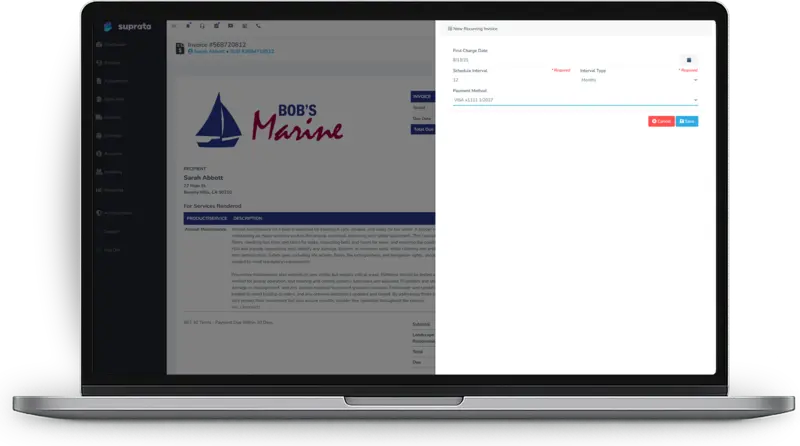
A Suprata invoice with a new recurring invoice panel for the first charge date, interval and saved card

Suprata is a versatile workflow and business intelligence platform that delivers the power of custom software with ease and affordability. Buy Suprata Suite tonight and be set up in minutes. Then shape it as far as your business logic, intelligence and workflows need.

How money moves

One chain from quote to books

Nothing is retyped between steps. Each one builds on the record the last one left behind.

How money moves from estimate to your accounting systemAn estimate with options is approved and signed online with a deposit, the work is done, time and parts roll into a taxed invoice, the customer pays by card, bank payment or autopay, and the records sync to QuickBooks Online or Xero.EstimateOptions to chooseGood, better, beston one pageApproveSigned onlineDeposit takenat approvalDo the workTime and partsEverything rollsinto a draft invoiceInvoiceBuilt from the jobTax by categoryand locationGet paidLink, portal, autopayCards and ACHthrough your processorYour booksSynced for youQuickBooks Onlineor XeroHow money moves from estimate to your accounting systemEstimateOptions to chooseGood, better, beston one pageApproveSigned onlineDeposit takenat approvalDo the workTime and partsEverything rollsinto a draft invoiceInvoiceBuilt from the jobTax by categoryand locationGet paidLink, portal, autopayCards and ACHthrough your processorYour booksSynced for youQuickBooks Onlineor Xero

Everything you bill and collect

Twelve tools, one ledger

Use what you need today. Everything else is already there when you grow into it.

Recurring billing

Bill weekly to yearly, ending on a date or after a set number of invoices. Send them as drafts or automatically, with autopay.

Recurring invoices

Deposits

Deposits are tracked apart from payments and balances. Take a fixed amount, a percentage or months up front, and hold or refund on your policy.

Handling Deposits

Counter sales and tills

Turn a front-desk computer into a register with opening counts, drops, blind close and over and short. Marinas use it for fuel and food sales.

Using Tills and Cash Drawers

Money that needs attention

One screen for every payment problem

The Accounting dashboard shows payments the bank sent back, cards that failed, bank transfers still clearing, what is due to charge itself and what you are owed.

  • Failed payments are marked cured, needing action or dismissed, so nothing is forgotten.
  • Returned bank payments are detected and recorded with their return codes.
  • Saved bank accounts and cards power autopay, payment plans and one-click checkout.
  • Corrections keep the audit trail intact and never touch your payment processor.

Help articles:The Accounting DashboardSetting up ACH and when to prefer itWhen a Payment Bounces or Lands on the Wrong Invoice

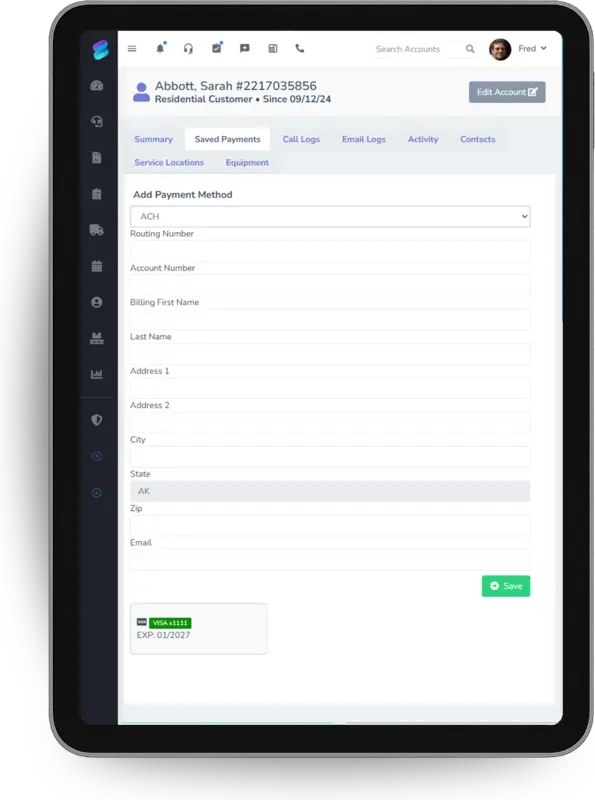
Adding an ACH bank account as a saved payment method on a customer account, on a tablet

Accounting sync

Your books stay in step, without double entry

Connect QuickBooks Online or Xero. Suprata sends the records your accountant needs, mapped the way your books are set up.

  • QuickBooks Online receives customers, items, closed invoices, payments, refunds, credit memos and, if you like, estimates.
  • Map it your way: income accounts with per-item overrides, receivables, undeposited funds, payment methods and tax codes.
  • Locations become classes. Each business unit maps to a QuickBooks class.
  • A sync report answers “why didn’t this push?” in under a minute.

Help articles:QuickBooks prerequisites — what to do before connectingQuickBooks first sync walkthroughQuickBooks tax code mappingReading the QuickBooks sync report

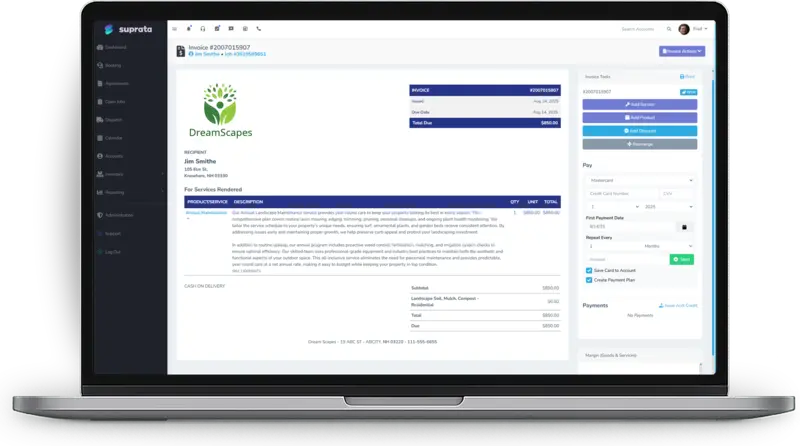
A Suprata invoice with the payment panel open, ready to charge a card or start a payment plan

Reservations and long stays

Billing for anything people reserve or rent

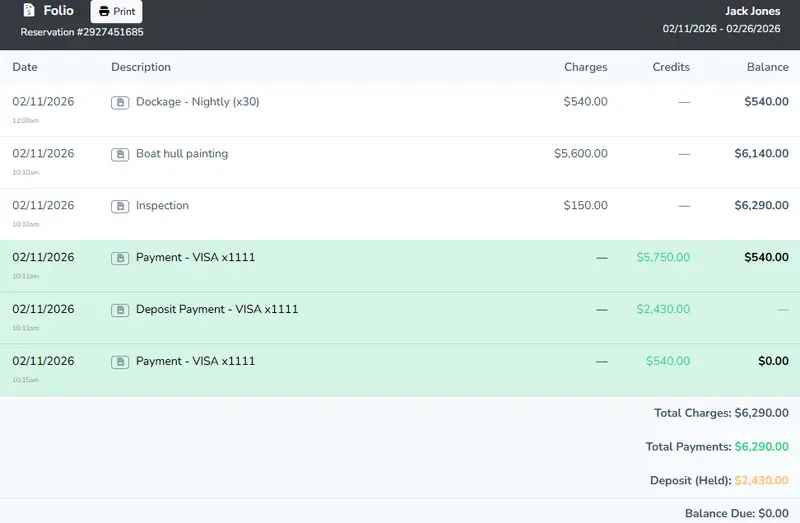
Each reservation keeps a running folio. Metered power and water, inspection findings, add-ons and credits land on it, and a nightly settlement turns each period into an invoice.

  • Prorated by day, half month or calendar month, set by type or reservation.
  • Late fees with a grace period, a flat amount, a percentage or whichever is greater.
  • Change a plan mid-stay with a prorated close-out and a linked history.

Help articles:The Folio Chain: Meters, Walks, Settlements, and BillingLong-Stay Billing and SettlementsLate Fees Configuration

A reservation folio listing dockage, hull painting and inspection charges, card payments, a held deposit and a zero balance

From the help center

Read exactly how it works

Every capability on this page is documented in the Suprata help center. Start with these articles.

Jobs & Work Orders The Job-to-Invoice Chain: From Service Call to Synced Payment How a job becomes an invoice becomes a synced QuickBooks transaction: industry forms attach automatically, time and parts roll up to a draft invoice... Read the article Invoicing & Estimates Creating an invoice — where and how Suprata creates invoices in five different ways, and which path you use changes what gets pre-populated and what you have to fill in. Here's the full... Read the article Invoicing & Estimates Recurring invoices Recurring invoices generate billing on a schedule — monthly maintenance plans, quarterly retainers, annual licenses. Here's how to set up a schedule... Read the article Service Agreements Subscriptions vs. Service Agreements vs. Recurring Invoices Three different ways Suprata handles ongoing customer relationships. They look similar on the surface and trip people up constantly. Here's how to... Read the article Payments & Processors Connecting Stripe Connecting Stripe to Suprata is what unlocks online payment links on every invoice. Here's the connect flow, what to test before going live, and the... Read the article Payments & Processors Setting up ACH and when to prefer it ACH costs much less than cards but settles slower and fails differently. Here's when to push customers to ACH, when not, and the settlement and... Read the article Reservations Handling Deposits Deposits are not payments and not balances — they're a third thing. Here's how the Reservations system tracks them, how refund timing works, and the... Read the article Reports & Dashboards The Aging Report — Who to Chase First Reading A/R aging buckets so you know which customers to call today, which to call this week, and which to write off. Triage logic, not just a column... Read the article Integrations QuickBooks first sync walkthrough Walk through the QuickBooks setup wizard — account mappings, class mappings, payment-method mappings, sync settings — and what to verify after the... Read the article

Ready when you are

Send your first invoice tonight.

Suprata is a versatile workflow and business intelligence platform that delivers the power of custom software with ease and affordability. Start with Suprata Suite on your own tonight, or let our team shape it around the way you work.

Or call 888-494-4335 hello@suprata.com