
Suprata Marina Reservations
Run every slip, site and stay from one engine
Dockage, moorings, dry storage, haul-outs, campsites and long-term stays. Every reservation is tied to the boat, the customer, the map and the bill, so nothing is typed twice.
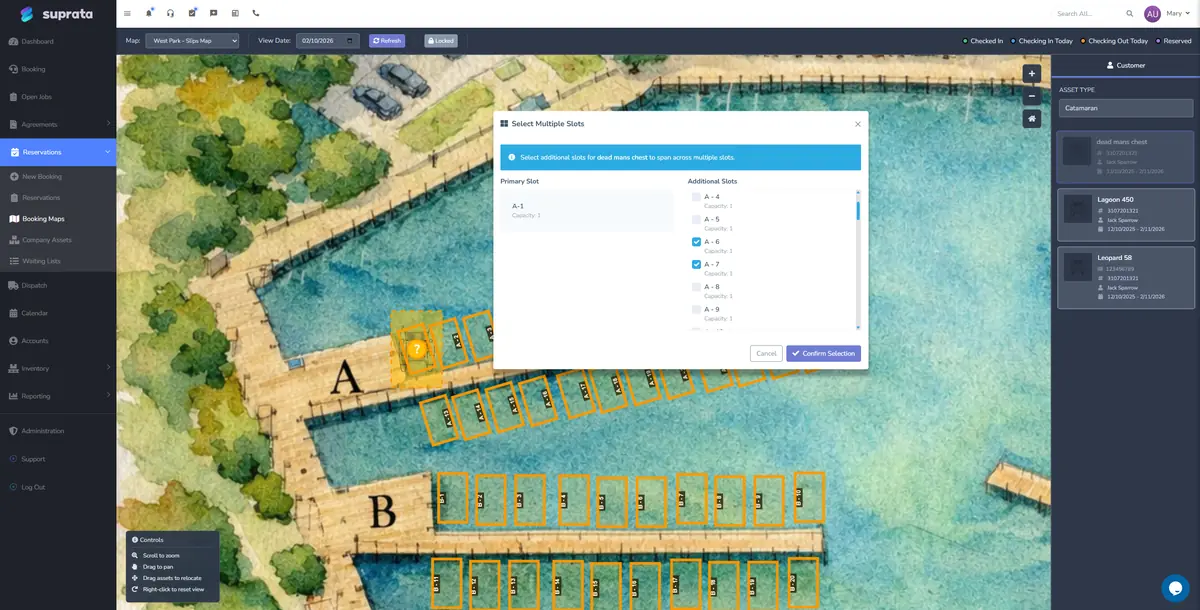
Slips, sites and maps
Every bookable space, on a live map
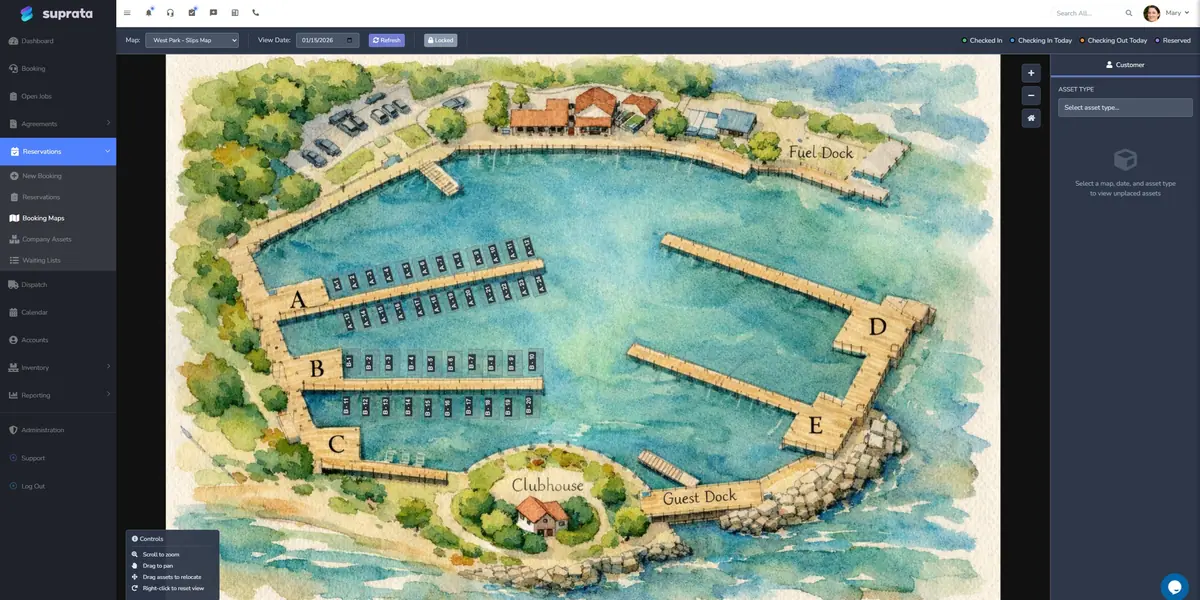
Wet, covered and dry slips, moorings, racks, sites, cabins and storage units. Set them up once by type and every space inherits the right rate, deposit and rules.
- Upload an aerial photo or use the drawn dock map
- Draw zones like Dock A or the mooring field
- Slip size checked against the boat before booking
- Close a slip for repairs with a reason and dates
- Ready-made boat and RV types with length, beam and draft
- Publish a map to customers or keep it staff-only
Booking
At the desk, on the phone or online at midnight
One booking flow for staff and customers, from first click to confirmation email.
The booking wizard
Check availability, hold the space for a few minutes and confirm with a final conflict check. Staff can override a price, a deposit or a document requirement with a note.
Online booking on your website
A drop-in widget for your own site. Guests pick dates, choose a type and pay a deposit or the full stay. Confirm automatically or review first.
Book by type, assign later
Campgrounds, cabins and hotels can sell a site type and assign the exact unit at booking, at check-in or from the tape chart.
Calendar and timeline
Two views of the same bookings, both printable. Staff can subscribe to a calendar feed in Google, Outlook or Apple.
No double-bookings
Holds and conflict checks stop double-bookings before they happen. When someone works around the wizard, a clear fix is waiting.
Change plans mid-stay
A transient guest goes seasonal, or a tenant moves to a bigger slip. Close out what was used and start the new plan, linked together.
Rates, deposits and fees
The right price, every time
Rates by season, length, location and customer type. Deposits, taxes and fees are applied for you.
Rate calendar
Nightly, weekly and monthly rates, seasons, weekend rates, minimum stays and stop-sell dates. The night price sets itself.
Per-foot pricing
Price by the boat’s length overall, or by the greater of boat length or slip size.
Packages
Bundle a space, a date pattern and add-ons like power and pump-outs into one sellable unit.
Deposits and damage holds
Fixed, percentage or months-up-front deposits, card holds, and a dashboard that flags anything missing or short.
Late fees
A grace period, a flat fee, a percentage or the greater of the two, applied every night and paused for disputed invoices.
Available while away
Rent a long-term holder’s exact spot to transient guests while they are gone, without touching their billing.
Folios and settlements
Prorations and settlements in one click
Every stay has a live folio. Each night a settlement run bills what is due, on each reservation’s own schedule.
- Prorated rent by the day, the half month or the calendar month.
- Meter usage, inspection findings and late fees added to the same invoice.
- Saved cards charged on schedule, so there are no month-end invoicing runs.
- Closed periods are locked and corrected with a credit, so the history stays clean.
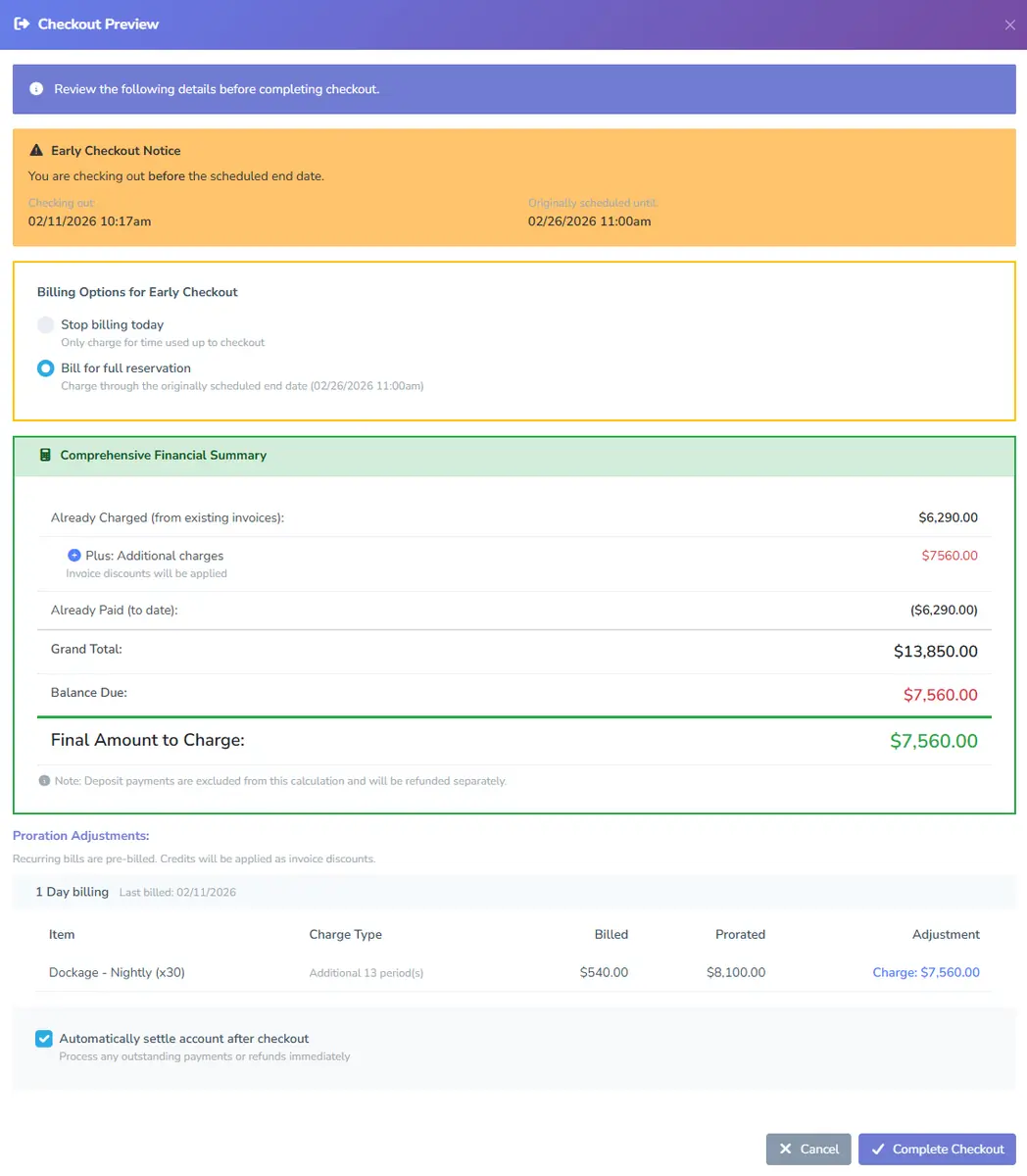
- Early checkout lets you stop billing today or bill the full stay, with the math shown first.
Meters and audit walks
Bill what was used. Catch problems early.
Utility meters
Meter electricity, water or sewer for each slip or site. Readings arrive from the meter on a schedule or are keyed in by staff. Each period bills the actual use, like “412 kWh × $0.16”, on the next settlement.
- A baseline reading before the first bill
- A rate per type, with overrides per slip
- Corrections keep the reading history
Audit walks
Walk the docks with a phone or tablet. Check every space against a template, rate its condition, take photos and compare them to earlier ones to confirm the right boat is in the slip.
- Findings can be billed to the folio
- A dashboard of open findings and trends
- History for every slip and site
Waitlists
Keep demand organized and fill openings fast
When you are full, a public waitlist captures the demand you cannot serve yet, instead of sending it to the marina down the shore.
- As many named waitlists as you need
- A sign-up form on your own website
- Customers can join more than one list
- A status page that shows their place in line
- Optional paid placement, billed on one invoice
- Turn the next person into a booking in a few clicks
Passes, resources and sessions
Sell more than slips
Launch ramps, day-use areas, pavilions, tours and classes run on the same customer record and the same bill.

Passes & permits
Sell day passes, launch permits, seasonal stickers and vendor permits, with caps, approvals and a QR proof staff can scan.

Scheduled resources
Book a ramp, dock, wash bay, pavilion or court by the hour. Price per hour, per slot, per vessel foot or per person.

Ticketed sessions
Sell seats on tours, classes and charters. QR tickets, check-in scanning and a printable roster for whoever runs it.
Contracts, e-signatures and documents
Signed contracts and current insurance, without the chasing
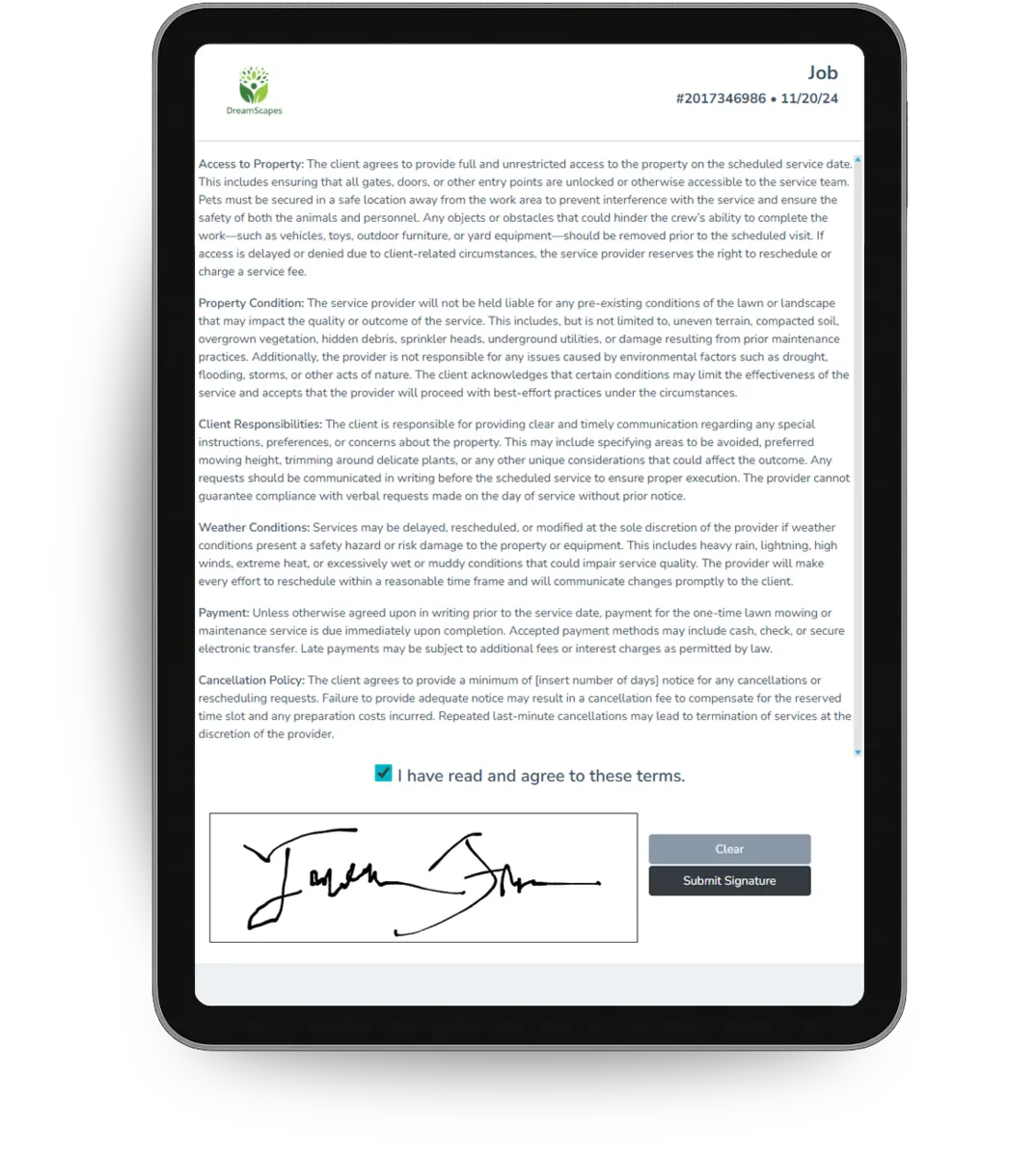
Each reservation type carries its own contract terms. Customers sign online, and a signed copy is emailed back.
- Terms are frozen at booking, so a later wording change never rewrites a signed contract.
- Required documents per type, like a certificate of insurance or a vessel registration, can block a booking until they arrive.
- Customers upload through the portal, and staff approve each document from a queue.
- Expiring documents trigger reminders 30 days ahead, one combined email per customer.
Point of sale
Fuel, the ship’s store and food, on one register
The fuel dock, the store, the café and the front desk sell through the same point of sale. Charge it to the customer’s account and dockage, fuel and purchases land on one statement.
- Cash drawers with opening counts, drops, blind close and an over-and-short check.
- Cards and bank payments through Stripe or USIO, plus saved cards on file.
- Inventory updates as items sell, with purchase orders to restock the chandlery.
- Sales tax by category and location, and tax reports when you file.

Every feature, documented
Read exactly how it works
Every Reservations feature has a step-by-step help article. Here they all are.
| Help article | What it covers |
|---|---|
| Is the Reservations System Right for You? | A decision-frame for whether the Reservations system fits your business. Built for marinas, campgrounds, RV parks, storage, and asset rental — not for one-off service jobs. |
| Setting Up Suprata for a Marina | The marina setup wizard builds most of your marina in twenty minutes — docks, slips, per-foot rates, packages. This guide covers the wizard, then the parts it deliberately leaves to you: metering, audit walks, settlement and seasons. |
| Setting Up Suprata for a Marine Service Company or Boatyard | A setup plan for a boatyard or marine service company that combines service jobs (engine work, hull repair, electrical) with asset rentals (slip rental, dry storage). The hybrid case where reservations and jobs both matter. |
| Setting Up Suprata for a Campground or RV Park | A practical setup plan for an RV park or campground running on Suprata. Sites, hookups, packages, long-stays, pet policies, audit walks, and the order to do it in. |
| Setting Up Asset Types | Asset types are the categories your bookable inventory falls into — slips, sites, cabins, units. Get these right first, because every asset inherits its defaults from its type. |
| Importing Asset Types from the Library | A shared catalog of ready-made asset types — boats, slips, RVs, sites, machines — with their measurement fields already set up correctly. Import what you handle instead of building it by hand. |
| Creating Your First Asset | Add one real, individual bookable thing — a specific slip, site, cabin, or unit — and walk it through a full booking before you add the rest of your inventory. |
| Uploading and Configuring Your Property Map | Upload an aerial photo or marina/campground layout, draw zones, and pin assets at coordinates. Visual booking is one of the system's better features — but the upload has gotchas worth knowing first. |
| The Booking Wizard Walkthrough | End-to-end booking — from customer intent to confirmed reservation — from both the customer's and the staff's perspective. The most-used flow in the Reservations system. |
| Taking Online Bookings | A drop-in booking widget for your own website — guests pick dates, choose a type, and pay, just like a hotel site. No account, no email-verification hoops. Plus the inbox where your staff manage what comes in. |
| Hotel & Campground Bookings (Booking by Type) | Marinas book a specific slip. Hotels and campgrounds book a *type* of room or site and assign the exact unit later. This is how to set the system up to work the way a front desk actually works. |
| Calendar and Timeline Views | Calendar and timeline are two visualizations of the same reservation data — and they're good at different things. Pick the right one for the question you're trying to answer. |
| Handling Conflicts and Double-Bookings | Most double-bookings the system prevents. The few that slip through usually involve human action that bypassed the booking wizard. Here's how to prevent them and how to resolve them when they happen. |
| Changing a Guest's Plan Mid-Stay | A transient guest wants to go seasonal. A monthly tenant upgrades to a bigger slip. Change Plan closes out what they've already used, then hands you a pre-filled booking wizard for the new arrangement — and links the two reservations so the history stays intact. |
| Available While Away: Renting a Spot While the Owner Is Gone | When a long-term holder leaves for a stretch, you can release their exact spot to transient guests for that window — without touching their reservation or their billing. Here's how to set it up and what it changes on the map, timeline, and walk-through. |
| Dynamic Pricing & the Rate Calendar | Hotels and campgrounds don't charge one flat rate — weekends, peak season, and minimum stays all move the price. The Rate Calendar lets the night price set itself, and the tax engine handles the rest. |
| Building a Package | Packages bundle an asset, a date pattern, and a list of add-ons into one sellable unit. Useful for repeating shapes — but easy to overuse. Here's when to build one and when to skip it. |
| Handling Deposits | Deposits are not payments and not balances — they're a third thing. Here's how the Reservations system tracks them, how refund timing works, and the policy decisions you should make in advance. |
| Late Fees Configuration | Late fees are a policy decision before they're a software setting. Decide your grace period, your fee structure, and who's exempt — then configure the system to enforce it consistently. |
| Long-Stay Billing and Settlements | Monthly tenants don't fit the same model as a weekend booking. Here's how Suprata bills long stays month by month, how proration works on partial months, and what to check before going live. |
| The Folio Chain: Meters, Walks, Settlements, and Billing | How a long-stay reservation becomes a monthly invoice: meter readings flow into the folio, audit walks add ad-hoc charges, settlement closes the period, and late fees catch what's overdue. |
| Setting Up Utility Meters | Meter electricity, water, or sewer dump per asset and bill the actual usage back to the tenant. How readings flow in, how billing works, and the gotchas to watch for. |
| Audit Walks: The Monthly Property Inspection | An audit walk is a structured property inspection — every asset checked against a template, findings recorded, photos uploaded. Use them to catch issues before they become emergencies. |
| The Public Waitlist | When you're full, a waitlist captures the demand you can't currently serve. Run it well and customers feel cared for; run it poorly and you alienate the people who wanted you most. |
| Setting up the public waitlist | When you're booked solid and customers are still calling, a public waitlist gives them a way to wait their turn instead of going to a competitor. Here's how to set one up, what to ask for on the form, and how to keep the list manageable. |
| Managing waitlist entries | A waitlist that fills up but never gets worked is just dead weight. Here's the daily rhythm for going through entries, contacting customers, and turning sign-ups into actual bookings. |
| Should each preference be its own spot in line? | When a customer would take a 30-foot slip or a 40-foot slip, do they get one place in line or two? This setting decides — and it changes how the queue is ranked, billed, and worked. Here's when to turn it on. |
| Embedding the waitlist on your website | Embedding the waitlist form on your own website lets customers sign up without leaving your site. Here are the two embed options, when to use each, and how to make the form match your site's look. |
| Passes & Permits — Selling and Issuing Access | Sell or issue day passes, launch permits, seasonal stickers, and vendor permits — with quotas, approval, custom fields, online sale, and a scannable QR proof. |
| Booking Shared Resources by Time Slot | Let customers reserve a dock, bay, court, or room for an hour instead of a night — with eligibility gated by permit, fees priced by size or duration, and self-service booking on the portal. |
| Selling Seats on Scheduled Sessions | Publish a booked session — a tour, a class, a guided trip — and sell seats to the public, then hand whoever runs it a printed roster with every name, class, and payment status. |
| Required Documents per Asset Type | Insurance certificates, vessel registrations, government IDs — different asset types require different documents. Configure the requirements once at the type level and the system tracks compliance automatically. |
| Staying ahead of expiring documents | Insurance certificates lapse. Liability waivers age out. Captain's licenses need renewal. The Expiring Soon dashboard is where you catch all of that before it becomes a problem — with one-click reminders that send the customer a single link covering everything they owe. |
| Using Tills and Cash Drawers | Turn a front-desk computer into a cash register with opening and closing counts, drops and deposits, and end-of-shift reconciliation — so every dollar of cash is accounted for. |
Questions
Reservations, answered
Is Reservations sold on its own?
Reservations comes with Suprata Marina, together with the complete Suprata Suite. See what the Suite adds, or ask about pricing.
Can it run a campground or storage facility?
Yes. The same engine books campsites, RV sites, cabins, storage units and rental equipment. Campgrounds can book by site type and assign the exact site later. Is the Reservations system right for you?
How are seasonal tenants billed?
Each long stay has its own billing schedule. A nightly settlement run prorates rent, adds meter usage and inspection charges, creates the invoice and charges a saved card if you use autopay.
Can guests book from our website?
Yes. Paste the booking widget into your site. Guests choose dates and a type, then reserve, pay a deposit or pay in full. New bookings arrive in an inbox for staff.
How long does setup take?
The marina setup wizard builds most of a marina in about twenty minutes. A 40-slip marina can be taking bookings the same afternoon. A large multi-dock operation is a project of a few weeks, and our team can do it with you.
Suprata Marina
See Reservations on your own docks
Book a live demo with your slips, rates and seasons. Pricing is shared on the call.