
Suprata for building, planning and permitting offices
From the first question to the final inspection, online
Permit offices spend their days answering the same questions, chasing missing documents and keeping track of who has which set of plans. Suprata Permits takes the application online, checks the parcel and the fee as the applicant answers, routes reviews with timers and issues a permit with a QR code. Suprata Inspections collects fire and life safety test reports from outside contractors.

Sound familiar?
What a normal week looks like without the right system
We hear these from building, planning and permitting offices all the time. Here is what Suprata does about each one.
Every morning starts with six voicemails asking which permit someone needs for a fence.
A guided start asks two quick questions to suggest the right permit, and a virtual assistant answers from your own help library and fee schedule.
I find out the lot is in a flood zone after the applicant has already paid for drawings.
Planning and zoning checks the chosen parcel for zoning district, wetlands, flood zone and slope before the application goes in.
Plans bounce between engineering, fire and zoning and nobody knows who is sitting on them.
Each permit shows a workflow strip of finished, current and upcoming steps, with business-day timers and escalation after the approve-by date.
Variance hearings mean I spend a full day pulling abutters and typing mailing labels.
Abutter search finds every parcel within 200, 500 or 1,000 feet and produces owner mailing labels as a Word document.
What runs your day
The parts of Suprata that fit building, planning and permitting offices
Suprata is a versatile workflow and business intelligence platform that delivers the power of custom software with ease and affordability. These are the pieces that matter most to you.
Suprata Permits
Online applications, fee estimates, plan markup, reviews, issuing with a QR code and field inspections.
See Permits Ready-made solutionSuprata Inspections
Outside contractors file sprinkler, alarm, backflow and other test reports online, and owners get notices automatically.
See Inspections Ready-made solutionSuprata Agenda
Puts zoning applications on planning board and appeals board agendas, with packets and minutes.
See Agenda Ready-made solutionSuprata Engage
Collects public comment on a zoning rewrite or a large site plan with map pins and formal comments.
See Engage Ready-made solutionSuprata Forms
Routes internal requests, such as fee waivers or inspector overtime, for signatures.
See FormsA day in the life with Suprata
One ordinary day, start to finish
Here is how the work flows when every call, job, booking and payment lives in one place.
-
8:00 am
Work queue
The plans reviewer opens her queue and sees which applications are close to their approve-by date.
-
9:30 am
Plan markup
She marks up a site plan directly on the drawing, comments on each mark and returns it to the applicant with a form letter.
-
11:00 am
Parcel checks
A homeowner applies for a dock permit, and the map checks show the nearest waterbody and the distance.
-
1:00 pm
Field inspection
An inspector passes a footing on the phone app with photos and a typed signature, and the permittee is notified right away.
-
3:00 pm
Permit issued
The building official signs the final approval, and the permit PDF is generated with standard conditions and a QR code.
-
4:30 pm
Board prep
The zoning administrator places two variances on next week's planning board agenda and prints abutter labels.
See it on screen
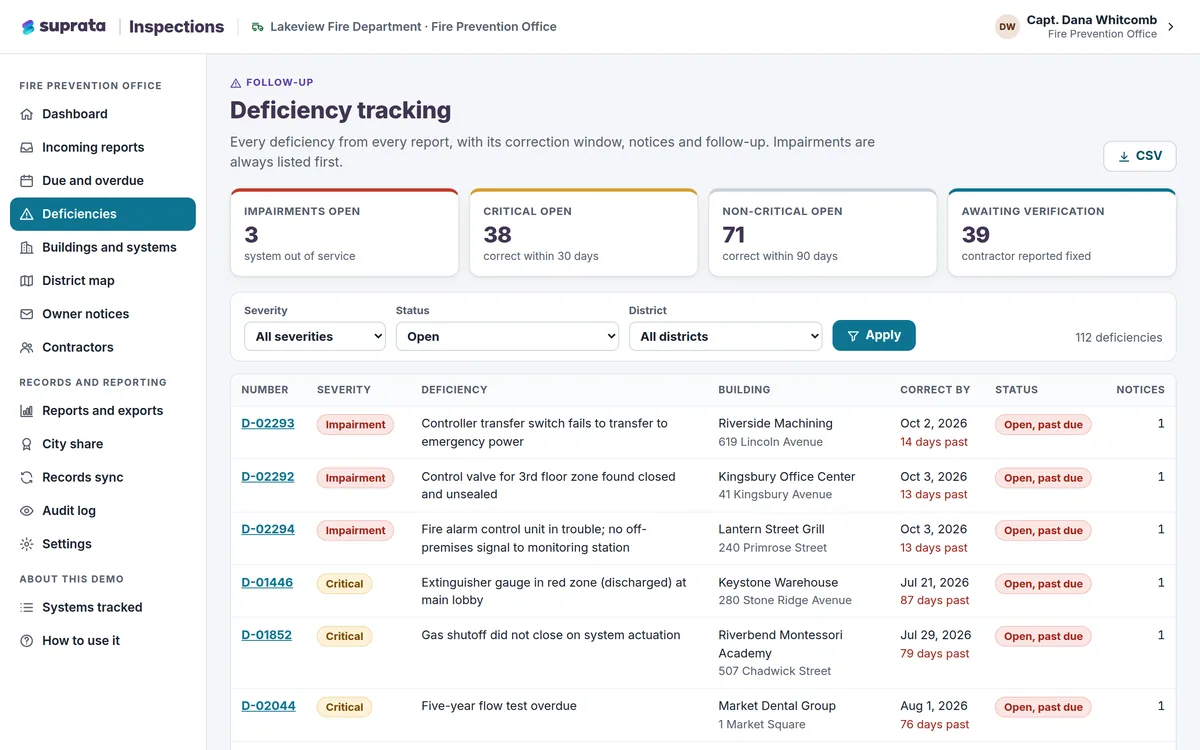
Real Suprata screens
Sample data, real software. Every screen below comes straight from Suprata.
Questions we hear
Straight answers
Asked by building, planning and permitting offices before they switch.
From the help center
Can applicants pay online?
Yes. Applicants pay by card or by bank transfer from a saved account, and the fee estimate updates as they answer questions.
Can an inspector or the public check if a permit is real?
Yes. Every issued permit carries a QR code that opens a verification page showing whether it is still valid.
Can we set up our own permit types and workflows?
Yes. Administrators set fees, required documents, questions, workflow steps and business rules without code.
We are a small town with a part-time zoning officer. Is this too much?
Planning and zoning gives each community its own portal with its own permit types and fees, and several small towns can share one setup.
Something else? Call 888-494-4335, email hello@suprata.com or ask “Does Suprata do this?”
Close neighbors
Also built for


Let’s talk
See it working with your own rules
Every Suprata solution is shaped around how your organization works. Book a demo and we will walk you through it, then talk pricing.